# Banner
| Contact: | Please work directly with your assigned Account Executive and Solutions Consultant. |
| ----------------- | ----------------------------------------------------------------------------------- |
| Released/Updated: | 2025-01-23 |
## Implementation
### Duration
It is crucial to supply all necessary integration details as soon as possible to provide the best possible service and the fastest implementation time. The document section “Checklist” lists all the required information ProcessMaker needs to ensure a quick implementation and go-live.
The typical variation time varies by installed solutions (TCE for Prospects and TCE for Applicants), the integration method (with or without Banner Ethos and the availability of a database abstraction layer), the deployment type (On-premises and SaaS Cloud), and the optional SSO setup.
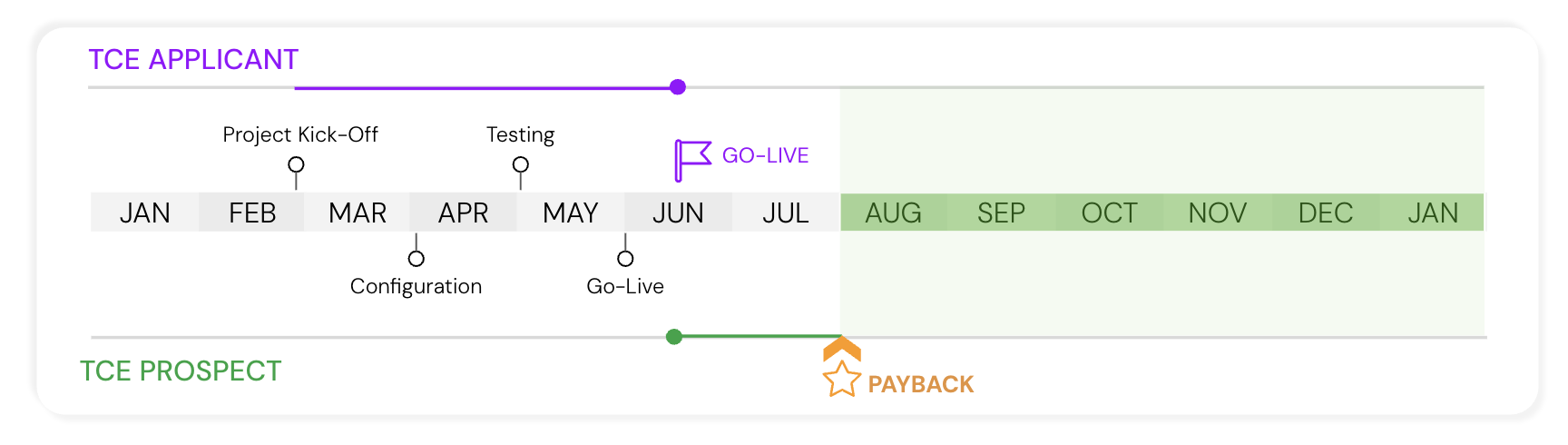
The initial setup and rollout can be as quick as 14 days. However, most implementations range from 1 to 2 months, with some slightly exceeding that based on the availability of the customer resources and ability to collaborate timely.
#### Timeline: TCE for Prospects and Applicants
***
### Prerequisites and Required Information
* ProcessMaker TCE
* Ellucian Banner
* [Option A — Ellucian Ethos](https://processmaker.gitbook.io/higher-ed/technical-documentation/student-information-system/banner/integration-via-ellucian-ethos-recommended)
* [Option B — REST API Layer to abstract Ellucian Banner database tables.](https://processmaker.gitbook.io/higher-ed/technical-documentation/student-information-system/banner/integration-via-ellucian-tables)
* [SSO (optional)](#sso-optional)
To identify required accounts and API keys, please refer to the relevant section below describing Option A and Option B in more detail. Additionally, the checklist appended at the end of this document will briefly list all information required by ProcessMaker to ensure a speedy
Optional Components
Single Sign-On (SSO) in ProcessMaker allows users to log in through a centralized identity provider rather than maintaining separate credentials for ProcessMaker itself. This streamlines access to ProcessMaker’s workflow and process management features while enhancing security and user convenience.
ProcessMaker supports integrations with various SSO providers—including Microsoft (Azure AD), Google, Okta, and other SAML-compatible services—using widely adopted protocols like OAuth and SAML. With these integrations, organizations can unify authentication management and leverage existing identity infrastructures without disrupting users’ login experiences.
***
## Course Articulation Overview
Watch the following product tour to learn how course are transferred from student transcriptions to Banner:
{% embed url="" %}
***
## Student Information System (SIS) Integration
There are two options to integrate with your Student Information Information. Click on the links below to learn more.
Option A Integration via Ellucian Ethos (Recommended)
{% hint style="info" %}
Please note that this edition of the “Transfer Credit Evaluation (TCE) — Technical Documentation” is only valid for integration with Ellucian Banner.
If you operate a different SIS, please contact ProcessMaker to provide the respective documentation.
{% endhint %}
***
## SSO (optional)
The required SSO parameters depend highly on the single sign-on provider used. Please refer to the ProcessMaker online documentation for SSO at .
The online documentation contains a section for all relevant services:
* Atlassian →
* Auth0 →
* Facebook →
* GitHub →
* Google →
* Keycloak →
* Microsoft →
* SAML →