# Colleague

| Contact:          | Please work directly with your assigned Account Executive and Solutions Consultant. |
| ----------------- | ----------------------------------------------------------------------------------- |
| Released/Updated: | 2025-01-23                                                                          |

## Implementation

### Duration

It is crucial to supply all necessary integration details as soon as possible to provide the best possible service and the fastest implementation time. The document section “Checklist” lists all the required information ProcessMaker needs to ensure a quick implementation and go-live.

The typical variation time varies by installed solutions (TCE for Prospects and TCE for Applicants), the integration method, and the optional SSO setup.&#x20;

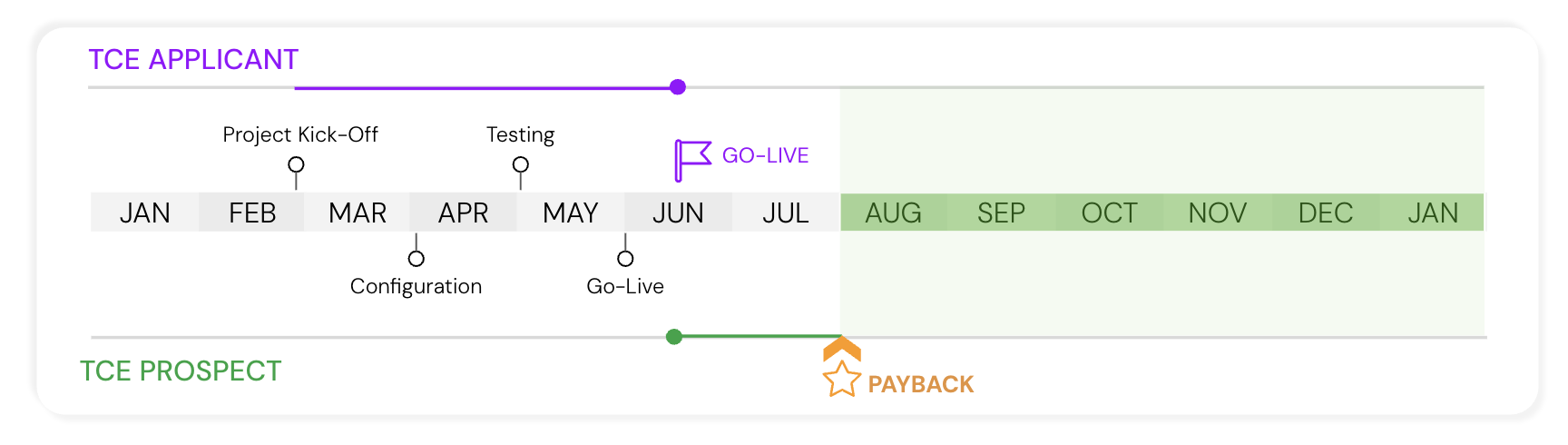
The initial setup and rollout can be as quick as 14 days. However, most implementations range from 1 to 2 months, with some slightly exceeding that based on the availability of the customer resources and ability to collaborate timely.

#### Timeline: TCE for Prospects and Applicants

<div data-with-frame="true"><figure><img src="https://1673751894-files.gitbook.io/~/files/v0/b/gitbook-x-prod.appspot.com/o/spaces%2FpisLLG0J0aZVvLC2PWlL%2Fuploads%2FFK4zTzKbRLFaTjHzsSm7%2FTCE%20Timeline%20-%20Prospects%20and%20Applicants.png?alt=media&#x26;token=01d41273-5601-4607-884a-454a4b6547d3" alt=""><figcaption></figcaption></figure></div>

***

### Prerequisites and Required Information

* ProcessMaker TCE
* [Ellucian Colleague](#ellucian-colleague-with-ethos)
* [Ellucian Ethos](#integration-via-ellucian-ethos)
* [SSO (optional)](#sso-optional)

<details>

<summary>Optional Components</summary>

**Single Sign-On (SSO)** in ProcessMaker allows users to log in through a centralized identity provider rather than maintaining separate credentials for ProcessMaker itself. This streamlines access to ProcessMaker’s workflow and process management features while enhancing security and user convenience.&#x20;

ProcessMaker supports integrations with various SSO providers—including Microsoft (Azure AD), Google, Okta, and other SAML-compatible services—using widely adopted protocols like OAuth and SAML. With these integrations, organizations can unify authentication management and leverage existing identity infrastructures without disrupting users’ login experiences.

</details>

***

## **ProcessMaker and Colleague Integration**

We manage new course equivalency rules directly within ProcessMaker, and this process is completely transparent to your users.

Once equivalencies are determined, ProcessMaker automatically posts them to the Student Record in Colleague, ensuring your system stays accurate and up to date. Watch the following product tour to learn more:

{% embed url="<https://demos.processmaker.com/demo/cm9ldrz3l041gx40iybfj8643>" %}

***

## Student Information System (SIS) Integration

{% hint style="info" %}
Please note that this edition of the “Transfer Credit Evaluation (TCE) — Technical Documentation” is only valid for integration with Ellucian Colleague.

If you operate a different SIS, please contact ProcessMaker to provide the respective documentation.
{% endhint %}

### Integration via Ellucian Ethos

Ellucian Colleague (through Ethos) provides an extensive selection of APIs to enable seamless integrations with third-party systems. These APIs allow external systems to communicate effectively with Colleague, promoting efficient data exchange and enhancements in functionality.&#x20;

This section will give a thorough overview of all the APIs used within the TCE solution process, outlining their purposes, functions, and contributions to the overall system integration.&#x20;

#### Authentication

The following settings/credentials are required to access and utilize the Colleague/Ethos API. These credentials ensure secure and authorized interaction with the API, enabling seamless data exchange and integration with third-party systems (here, ProcessMaker TCE).

<table data-header-hidden><thead><tr><th width="100"></th><th></th></tr></thead><tbody><tr><td><strong>Server URL</strong></td><td><p>The regional server URL. Typically, one of the following or a custom URL:</p><ul><li><a href="https://integrate.elluciancloud.com">https://integrate.elluciancloud.com</a> — Ethos Integration API U.S.</li><li><a href="https://integrate.elluciancloud.ca">https://integrate.elluciancloud.ca</a> — Ethos Integration API Canada</li><li><a href="https://integrate.elluciancloud.ie">https://integrate.elluciancloud.ie</a> — Ethos Integration API Europe</li><li><a href="https://integrate.elluciancloud.com.au">https://integrate.elluciancloud.com.au</a> — Ethos Integration API Asia-Pacific</li><li>Custom URL</li></ul></td></tr><tr><td><strong>API Token</strong></td><td>ProcessMaker's integration components utilize the Ellucian Ethos API token to retrieve the JWT token that facilitates API authentication.</td></tr></tbody></table>

{% hint style="info" %}
Please refer to your Ellucian Colleague/Ethos administrator to gather the above information.
{% endhint %}

#### Required APIs

This section lists all APIs utilized by ProcessMaker’s TCE solution. Please confirm that the API Token provides access to all the API endpoints below.

<details>

<summary>Student Management</summary>

<table><thead><tr><th width="128">Method/Type</th><th width="235">Endpoint</th><th>Purpose</th></tr></thead><tbody><tr><td>GET</td><td>/api/students</td><td>Retrieve a list of students by specific criteria (e.g., Student Type)</td></tr><tr><td>GET</td><td>/api/students/{id}</td><td>Retrieve a student’s details by Colleague ID</td></tr><tr><td>GET</td><td>/api/persons</td><td>Retrieve a list of person entities by specific criteria (e.g. Colleague ID)</td></tr><tr><td>GET</td><td>/api/persons/{id}</td><td>Retrieve a person’s details by Colleague ID</td></tr><tr><td>GET</td><td>/api/student-types</td><td>Retrieve the list of student types registered in Colleague</td></tr><tr><td>GET</td><td>/api/student-classifications</td><td>Retrieve the list of student classifications registered in Colleague</td></tr><tr><td>GET</td><td>/api/academic-levels</td><td>Retrieve the list of academic  levels registered in Colleague</td></tr><tr><td>GET</td><td>/api/administrative-periods</td><td>Retrieve the list of administrative periods registered in Colleague</td></tr></tbody></table>

</details>

<details>

<summary>Course Management</summary>

<table><thead><tr><th width="134">Method/Type</th><th width="210">Endpoint</th><th>Purpose</th></tr></thead><tbody><tr><td>GET</td><td>/api/courses</td><td>Retrieve a list of courses based on search criteria (e.g., course title)</td></tr><tr><td>GET</td><td>/api/course-statuses</td><td>Retrieve the list of course statuses registered in Colleague</td></tr><tr><td>GET</td><td>/api/subjects</td><td>Retrieve a list of subjects based on search criteria (e.g., abbreviation)</td></tr><tr><td>GET</td><td>/api/subjects/{id}</td><td>Retrieve the subject related to a particular course</td></tr><tr><td>GET</td><td>/api/course-title-types</td><td>Retrieve the list of course statuses registered in Colleague</td></tr></tbody></table>

</details>

<details>

<summary>Course Equivalency</summary>

<table><thead><tr><th width="100">Method</th><th>Endpoint</th><th>Purpose</th></tr></thead><tbody><tr><td>GET</td><td>/api/educational-institutions</td><td>Retrieve a given institution’s assigned  code</td></tr><tr><td>GET</td><td>/api/course-transfer-equivalencies</td><td>Retrieve course equivalencies</td></tr></tbody></table>

</details>

<details>

<summary>Privileges</summary>

<table><thead><tr><th width="353">Privilege</th><th>Request Type / Endpoint</th></tr></thead><tbody><tr><td>VIEW.STUDENT.INFORMATION (READ)</td><td><p>GET /api/students<br>GET /api/students/{id}</p><p>GET /api/student-types</p><p>GET /api/student-classifications</p></td></tr><tr><td><p>VIEW.ANY.PERSON (READ)</p><p><br></p></td><td><p>GET /api/persons</p><p>GET /api/persons/{id}</p></td></tr><tr><td>CREATE.UPDATE.COURSE {READ}</td><td><p>GET /api/courses</p><p>GET /api/course-statuses</p></td></tr><tr><td>VIEW.EDUCATIONAL.INSTITUTION (READ)</td><td>GET /api/educational-institutions</td></tr></tbody></table>

</details>

***

## SIS Modifications and Update

<figure><img src="https://lh7-rt.googleusercontent.com/docsz/AD_4nXdmtw6bLGMO5Gi5yfKJNQ9hdQWapSWxqbbBf43xMugQ43hcqsB65bth80kQQjXnUJhXGsSCkaA8ZvShc0zdmQbj1woAnbEz_U5lbI1s7OlLTK9Jdl_iKn1hb3ZXCUDAAdpf9qaIgA?key=JIRMXZbtdQ7MYOQcHgCLVtxD" alt="" width="563"><figcaption></figcaption></figure>

<br>

ProcessMaker functions as an intermediary between users and the SIS. It stores any new and updated data within its Collections, a table-like structure integrated into the ProcessMaker BPA platform. Information sourced from the SIS will be enriched with data from ProcessMaker’s Collections. TCE users face no restrictions, and exports and reports can be generated if any information stored in ProcessMaker is required for review.

***

## Checklist

The following checklist includes all the information required and actions to be taken to set up the ProcessMaker TCE/Ellucian Colleague integration.

### Ellucian Colleague with Ethos

* [ ] Provide Ethos (Colleague) API Token — The API token is required to retrieve an API/user-specific JWT token.
* [ ] Provide API/Server URL —  The region-specific or custom API URL.&#x20;
* [ ] Ensure the API Token provides access to all required endpoints listed in this document.
* [ ] Ensure required API endpoint privileges have been assigned.

{% hint style="info" %}
Please refer to your Ellucian Colleague/Ethos administrator to gather the above information.
{% endhint %}

***

## VPN-Based Colleague Access

The ProcessMaker integration server is configured to securely interact with the Colleague system through a dedicated VPN connection:

* The server resides in an isolated private network and connects securely to your VPN.
* The VPN must be configured in full-tunnel mode, with timeouts disabled, and must allow connectivity to the Colleague system.
* You will provide us with a Colleague Service Account, which will then be used to perform write operations.
* All interactions with Colleague are executed using browser-based automation.

<figure><img src="https://lh7-rt.googleusercontent.com/slidesz/AGV_vUeDKE1QZ9xm3Orl8hpCI-sKlQvgAWKij58gIR-EP1xxck-m0FCcsZnlmLjVMEyYfImrSSIHmj2KsJCV-juaic1LBH-4wXfzBiOAllPOQ9zUKc6RW0zNaZnFe2qrX6DS3OTnD7fE=s2048?key=pIXoDFJ3Ebat6tmRWdr5F4UL" alt=""><figcaption></figcaption></figure>

***

## SSO (optional)

The required SSO parameters depend highly on the single sign-on provider used. Please refer to the ProcessMaker online documentation for SSO at <https://docs.processmaker.com/docs/sso-settings>.&#x20;

The online documentation contains a section for all relevant services:

* Atlassian → <https://docs.processmaker.com/v1/docs/sso-atlassian-settings>&#x20;
* Auth0 → <https://docs.processmaker.com/v1/docs/sso-auth0-settings>&#x20;
* Facebook → <https://docs.processmaker.com/v1/docs/sso-facebook-settings>&#x20;
* GitHub → <https://docs.processmaker.com/v1/docs/sso-github-settings>&#x20;
* Google → <https://docs.processmaker.com/v1/docs/sso-google-settings>&#x20;
* Keycloak → <https://docs.processmaker.com/v1/docs/sso-keycloak-settings>&#x20;
* Microsoft → <https://docs.processmaker.com/v1/docs/sso-microsoft-settings>&#x20;
* SAML → <https://docs.processmaker.com/v1/docs/sso-saml-settings>

## Built-in Colleague Integration

{% embed url="<https://demos.processmaker.com/demo/cmcnjujl30055xm0joswchvlx>" %}

## API Documentation from Colleague

ProcessMaker integrates with Ellucian Colleague through a set of RESTful APIs that manage **external coursework** and **transfer credit evaluations**. These APIs allow external transcripts, course details, and course-to-equivalency mappings to be created, updated, and retrieved programmatically—mirroring Colleague's native data structures and business rules.

These APIs support TCE (Transfer Credit Evaluation) workflows by ensuring that:

* Student external courses are accurately recorded
* Course equivalencies are evaluated and maintained consistently
* Credit mapping is synchronized between systems
* Validation, permissions, and institutional rules are enforced at API level

The integration relies on the following core REST resources.

<table data-card-size="large" data-view="cards"><thead><tr><th align="center"></th><th></th><th data-type="files"></th></tr></thead><tbody><tr><td align="center"><strong>Transfer Equivalency Evaluations API</strong></td><td>Download the file below to know about this API.</td><td><a href="https://1673751894-files.gitbook.io/~/files/v0/b/gitbook-x-prod.appspot.com/o/spaces%2FpisLLG0J0aZVvLC2PWlL%2Fuploads%2FIy9Ay26eI1MM3pazgMTK%2Ftransfer-equivalency-evaluations%201.0.0.pdf?alt=media&#x26;token=2ed8455a-5acf-4c9b-929c-50a06b2b55c7">transfer-equivalency-evaluations 1.0.0.pdf</a></td></tr><tr><td align="center"><strong>External Institution Courses API</strong></td><td>Download the file below to know about this API.</td><td><a href="https://1673751894-files.gitbook.io/~/files/v0/b/gitbook-x-prod.appspot.com/o/spaces%2FpisLLG0J0aZVvLC2PWlL%2Fuploads%2FDmdsNg54qpDfRh4UNLVH%2Fexternal-institution-courses%20v1.0.0.pdf?alt=media&#x26;token=99b5485e-d67a-4841-8fd8-098ada0483e7">external-institution-courses v1.0.0.pdf</a></td></tr></tbody></table>
